healcraft for Gmail™Beta
Lab results from an email, into the right chart
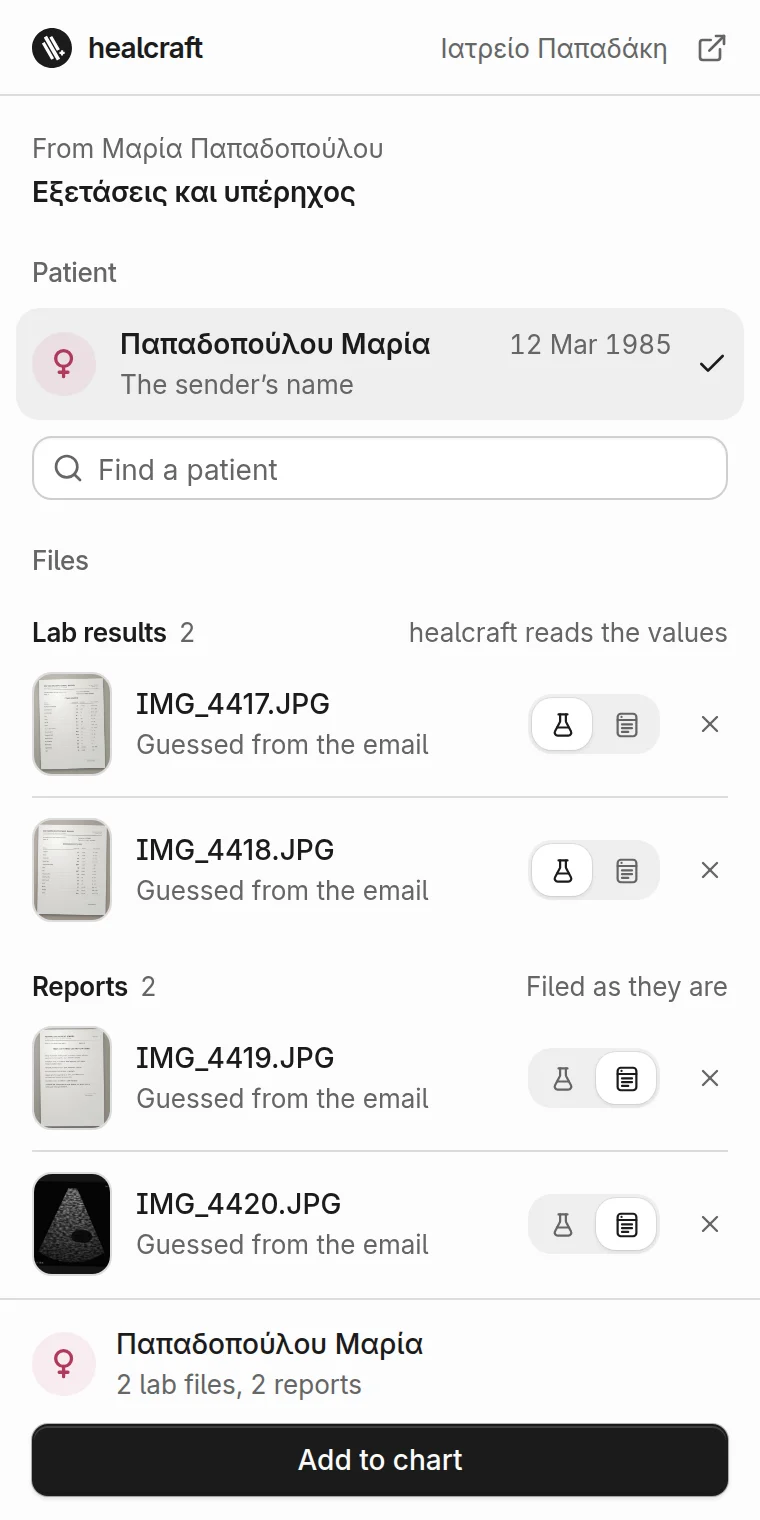
Open an email from a lab, a colleague or a patient and click the healcraft button. A panel opens beside it with the email’s files sorted into lab results and reports, and the patient they belong to. One click adds them to the chart, without downloading a thing.
Needs a healcraft account and Chrome on a computer.
How it works
Open the email
Click the healcraft button with an email open in Gmail. The panel opens beside it, signed in with your healcraft account.
Check what it found
Each file sits under lab results or reports, with a picture of it and a line saying what it is. The patient is picked when only one fits, with the reason. One click moves a file or leaves it out.
Add to chart
Lab results go in as one reading, which healcraft starts at once and leaves in Reviews for you to check. Reports are filed as they are. Phone photos, scanned pages and password-protected PDFs work too.
What it reads and keeps
Only the email you open
It reads the open email only while its panel is beside it: the subject, the sender, the date, the first 2,000 characters of the text and the files’ names. It opens the files themselves in the panel with your own Google sign-in. No other email, and nothing from your other tabs.
Sorted on your computer
It tells lab results from reports by a PDF’s own words, then by the email’s, on your computer. It uses no AI and sends nothing anywhere to do it.
The patient, found by rules
To suggest the patient, it sends healcraft the sender, the subject, the text and the file names, which healcraft compares with your practice’s charts and does not keep.
Nothing goes in until you say
A file reaches healcraft only when you choose Add to chart. From then on it is handled like any file uploaded in the app.
Little kept, on your computer
So nothing goes in twice, it keeps a note on your computer of which files each email already sent, and to which chart, never their contents. A password you type to open a PDF never leaves your computer.
Never for ads or AI training
What it handles is never used for advertising, never sold or shared with third parties, and never used to train AI.
What it needs
Chrome on a computer
Chrome 116 or later.
Gmail in the browser
Gmail on the web, with the chart’s own limits for every file: 14 MB a file, 40 pages a PDF, 10 files in one reading. Files can also be dropped into the panel from your computer.
A healcraft account
It has no sign-in of its own: sign in at healcraft.app in the same Chrome, and the panel signs in with you.
Questions
What doctors ask before moving their practice to healcraft.
Gmail and Chrome are trademarks of Google LLC.
Built for the consulting room. Available today.
Start your 14-day free trial. No credit card required.